


Is There a Safe Way to Access a NAS Remotely?
One of the most popular features of modern network-attached storage systems is remote access, but the term is often misunderstood. It’s reasonable to worry that accessing a home NAS over the internet could expose your data to attackers.
With the right tools and settings, though, remote access doesn’t have to be a security risk. Even non-technical users can securely access web-based apps and files from outside the home when remote access is set up properly.

Why do people think remote NAS access can be a security concern?
A NAS (Network-Attached Storage) normally sits inside your home network, behind your router. The router’s firewall helps block unsolicited traffic from the internet, and access to the NAS is usually limited to devices on your local network. In other words, the setup is secure because the NAS isn’t directly exposed to the internet.
Remote access changes that. When you connect to your NAS from outside the home, your traffic travels across the internet, which introduces new risks.
Concerns people can have include:
- Automated malicious login attempts via internet bots
- Exposed services that attackers can scan and exploit
- Lack of suitable passwords and old computer software
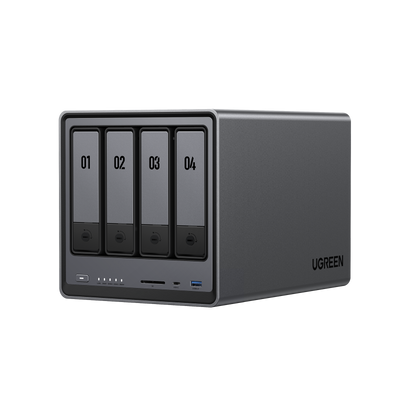
All of these risks apply to every Network Attached Storage (NAS) brand, and also UGREEN NAS devices. The distinction exists at the point of access to the storage device and the level of access permitted.
Why remote NAS access is different from local access
In practice, local access is limited to your home network. Your router blocks incoming traffic from outside, and only devices on your LAN that you’ve allowed can access the NAS.
Remote access is different. Because you’re connecting from outside your home, it requires an internet connection. In most cases, that usually means one of two approaches:
- Opening up your network to outside internet connections via the router
- Creating an encrypted tunnel between your device and your home network
This approach could be problematic if not properly carried out. It is usually considered safer to use the second method.
This matters for home users because a Network Attached Storage (NAS) device often holds sensitive files such as backups, family photos, tax documents, and work-related data. If that data is exposed or access is lost, the consequences can be serious.

Common ways people access a NAS remotely and their risks
Individuals can access their home NAS from the internet by using a variety of different methods. Most activities are not without their inherent risks but some are definitely safer than others.
Direct port forwarding
When you set up port forwarding, you tell your router to send incoming traffic on a specific port to a specific device, typically a home server or a NAS. Once that rule is in place, the service behind that port can potentially be reached from anywhere on the internet.
That’s why many people consider port forwarding a higher-risk option for home users. If a service is exposed, attackers can scan it, try common passwords, and probe for known vulnerabilities in the operating system or the web interface. The risk is especially high when the exposed service is an admin or management interface.
Router manufacturers and security organizations often warn against opening ports unless it’s truly necessary, and they generally recommend avoiding direct exposure of management pages. Cloudflare’s security guidance also discusses how exposed services increase your attack surface.
Cloud relay or quick connect style services
Some network-attached storage systems offer cloud-based remote access. With this approach, your phone or computer connects to your NAS through a vendor-operated cloud service or relay.
The main benefit is convenience. You usually don’t need to set up port forwarding or manually configure your router. The tradeoff is that you give up some control in exchange for simplicity, and performance can be slower since traffic may be routed through external servers.
To use these services safely, it’s important to understand what protections are in place, what data is shared with the vendor, and how your connection is secured.
Exposing NAS management interfaces
The most common mistake seen is when the full management interface of a NAS is left accessible via the Internet. They are, however, best used within a secured network environment.
Wherever possible, security guides from NAS vendors such as Synology and QNAP advise keeping their respective control panels offline from the internet, as stated in the official documentation for the products.
What is considered a safe way to access a NAS remotely?
Security experts concur that secure remote access revolves around limiting exposure. You can securely extend your own private network to wherever you are by not exposing your home NAS.
Remote access to the internet should be via a VPN
When you use a virtual private network, or VPN, it establishes a secure link between your computer and a network at your home. When you’re connected to the net via a VPN, your device behaves as if it were physically in your home country. This means that the NAS is not directly exposed to the public Internet.
All data exchanged is encrypted
Only registered users with a valid password may access the system.
Secure remote access to a network attached storage device is generally achieved through a VPN. Users who require secure remote access to their home networks are often advised in security guides to use a VPN.
The Electronic Frontier Foundation gives information on the security features and fundamentals of VPNs.
Private network tools such as Tailscale or ZeroTier
Networks such as Tailscale and ZeroTier are easier to handle than the typical virtual private network. This has advantages like:
- No need to expose the NAS directly to the internet
- Use end-to-end encryption in all services by default
- Simple setup for people even if you are not technical
Ever increasing numbers of home users of Network Attached Storage devices are turning to cloud backup software because it provides both good security and ease of use. Both projects give a detailed security overview on their home pages.
Use internet connection via mobile phone with care
You may sometimes want to access a specific service on the NAS. This could be a photo album or an online file sharing service. This can be achieved by using the secure HTTP transfer protocol (HTTPS) in conjunction with strong user authentication which is often facilitated by a reverse proxy server.
Whenever possible, two factor authentication should be enabled and only the required service should be exposed.

Best practices for secure remote NAS access
All remote network storage systems, regardless of the protocols used, must conform to certain fundamental principles.
Minimise what is exposed
Many systems and services can be made more secure by being internal and not exposed to the internet. This way they are not visible to the public and hackers.
Employ stringent verification checks to authenticate users
You need to have a password which is sufficiently difficult to guess. Use two-factor authentication wherever it is available. Most security breaches involve the theft of existing user credentials rather than reliance on a sophisticated hacking technique.
Keep the system updated
The security patches that come out for applications and the operating system of a NAS are comparable to those of a PC. Keeping your UGREEN NASync up-to-date will reduce the risk of known vulnerabilities being exploited.
Security organisations like the US-CERT, a service of the CISA, frequently highlight the importance of having the latest software updates installed.
Monitor access and logs
Early warning systems can be instituted by frequent monitoring of the login logs in order to spot any unusual activity. Basic monitoring can frequently lead to a noticeable difference.
How UGREEN NAS and NASync support secure remote access
UGREEN NAS devices are ideal for home and office users who require a device that is both simple and secure.
As opposed to encouraging the use of a potentially insecure setup, UGREEN NASync gives priority to secure access with standardised secure access methods. Working well with both private network tools and VPN based solutions, it means users are able to access their NAS over the internet, without exposing it to the world.
We do this through:
- Stable local networking
- Connect remotely via secure, tried-and-tested technologies
- Clear distinction between file access and admin access
This approach is consistent with all widely accepted security advice on the usage of consumer NAS devices.
Common mistakes to avoid
Errors frequently remain with even the best of tools available.
Exposing admin interfaces
The administrative interface of an application should not be made publicly accessible. One of the most common reasons for network attached storage equipment being hacked is because of weak passwords.
Prioritising convenience over understanding
When used in a careful and considered manner, the additional features which are designed to enhance convenience can be safe. Nevertheless, those risks can be increased by administrators who allow remote access to servers without first identifying what services are being made accessible.
Assuming RAID or backups equal security
Redundant Array of Independent Disks (RAID) prevents data loss in the event of a disk failure, not from an attack by hackers. It is backups that can assist in system recovery, not in stopping the original problem.
Ignoring updates and alerts
Running on unpatched systems and neglecting warning messages can result in increased security risks over time.
Conclusion - Yes, there is a safe way to access a NAS remotely
With the right technology in place, it’s safe to run a NAS remotely. It can easily combine security and practicality for everyday use.
Using a virtual private network and other tools for private networks are usually the most secure first steps. By configuring the device sensibly, acting on good security practice and utilising a product designed for personal users, the UGREEN NAS and the UGREEN NASync permit home users to access their files over the internet without exposing themselves to any increased risk.
Quick Navigation
Top Picks for You
£93
OFF


