UGREEN NASync: A Simple Guide to Building a Plex Media Server
If you use Plex for home media, there’s a good chance it’s running on an old desktop, or even your everyday laptop. Plex makes it easy for anyone on your home network to stream your films, music, and photos from pretty much any device. In practice, though, it only works when the computer hosting your library is switched on. So if you’ve repurposed Uncle Nigel’s old gaming PC into a DIY “cloud”, it still needs to be powered up for anyone to access the library, which often means leaving a full-sized computer running for long hours. The problem is that laptops and desktops were never really designed to act as quiet, efficient, always-on servers.
That’s where a NAS comes in. A NAS is built for 24/7 use, keeping your Plex library available whenever you need it, while using less power than a typical PC. It can also help you avoid ongoing subscription costs and keep your setup tidier at home.

Why a NAS is the perfect companion for Plex
When you use Plex, your main priority is a smooth viewing experience. In other words, for Plex to work best, it requires a device that doesn’t go to sleep. You can leave your laptop on all the time, but let’s face it, that’s not practical. Laptops and desktops are susceptible to updates, sleep settings, and accidental shutdowns that can disrupt access at the worst possible moment. And if you don’t leave it on, you have to go through the inconvenience of booting it up every time someone wants to access your shared library.
A NAS, short for Network Attached Storage, is a dedicated device that grants people on your home network access to your personal media library. You can think of it as a ‘home cloud’. The result is greater reliability with no untimely updates or accidental shutdowns, and therefore less explaining to your family about why “it’s not working again.”

New NAS users often wonder if BT or Sky broadband is fast enough to handle another streaming device. Many assume that since a NAS streams movies, it relies on their internet connection, just like Netflix. That’s a common misunderstanding. When you stream from your NAS (or your desktop for that matter), the videos play directly on your TV over your local network, so your broadband isn’t doing the heavy lifting.
Because a NAS is very energy-efficient, it can help lower your electricity bill. Let’s face it, energy prices in the UK remain above normal levels. Year-over-year electricity inflation was about 1.8% in late 2025, and unit costs have roughly doubled over the past five years. If a NAS replaces a desktop that would otherwise be running most of the day, you can easily save upwards of £100 per year on electricity.
Besides saving power, a NAS also helps reduce everyday clutter. Desktops and laptops take up space, generate heat, and are often surrounded by cables and external drives. A compact NAS can sit quietly on a shelf or in a cupboard, keeping everything tidy while it runs unobtrusively in the background.
Many Plex users start on their own, so using a laptop can be fine. But as soon as you start sharing your setup – whether a partner moves in or your children start using smartphones – having a NAS makes everyone’s life considerably easier. Everyone has access to the shared library, whether you are home or not. It is a ‘set and forget’ device that requires very little maintenance.
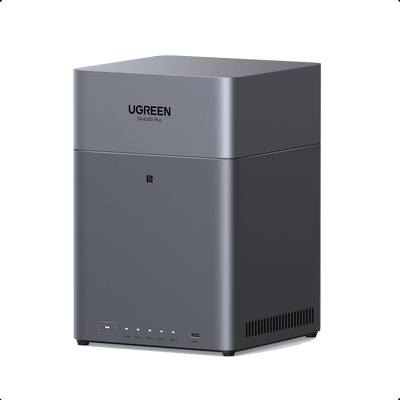
UGREEN NASync DH4300 Plus: a powerful, future-ready NAS for Plex users
The UGREEN NASync DH4300 Plus is designed for users who want a more capable and expandable home media server. With four drive bays supporting up to 120TB of raw storage, it offers ample room not just for today’s movie collection, but for years of growth as your Plex library expands.

Compared with entry-level NAS models, the DH4300 Plus delivers noticeably stronger performance. Its more powerful hardware makes it well suited for 4K media playback, larger libraries, and multiple simultaneous streams. Whether you are watching films locally, sharing content with family members, or accessing your media remotely, the DH4300 Plus provides a smoother and more responsive Plex experience.
Before NAS became widespread, proponents of the cloud argued that physical hard drives were unreliable because they could fail, leading to the loss of all your media. And it’s true. One major benefit of a NAS is its use of RAID technology. With four drive bays, the DH4300 Plus offers greater flexibility when it comes to data protection. You can configure RAID to balance storage capacity and redundancy, ensuring that your media remains accessible even if a drive fails.
This added flexibility also makes the DH4300 Plus a smarter long-term investment. Instead of replacing your storage setup every few years, you can simply add or upgrade drives as your needs grow. Starting with smaller drives and expanding over time helps spread costs while keeping your data protected.
Cost is another important consideration. Many UK households subscribe to multiple streaming services, with a significant number paying for three at the same time. Investing in a NASync DH4300 Plus with several hard drives may seem expensive upfront, but it can quickly pay for itself. Cloud storage from Google, Apple, or Microsoft typically costs £80–£110 per year for just 1–2TB. In contrast, the DH4300 Plus provides vastly more storage capacity without ongoing subscription fees, making it a cost-effective solution over the long term.
Setting up Plex on UGREEN NASync
UGREEN NASync is easy to use for basic file storage, but setting up Plex takes a bit more effort. That’s because Plex runs inside Docker rather than as a one-click app. Docker is a tool that lets apps run in their own self-contained environments, making them more flexible but requiring a few extra setup steps. The setup itself is straightforward, but it does involve a few more manual steps than beginners might be used to.
First, you’ll need to create a few folders using the Files app. Under Shared Folder > Docker, create a main Plex folder for Plex data and a Movies folder for your media. Inside the Plex folder, add two subfolders called config and transcode. These allow Plex to store its settings and handle video processing properly.
Next, open the Docker app and search for the linuxserver/plex image. Download it, then create a new container from that image. You can rename the container to “Plex” if you’d like, and it’s a good idea to enable auto-restart so Plex automatically comes back online after reboots. On the DH4300 Plus, enabling graphics acceleration during setup can further improve playback performance, especially for high-resolution media.
During setup, you’ll need to add two environment variables: your local time zone and a Plex claim token, which links the server to your Plex account during the first launch. You’ll also map your folders so Plex knows where to find its configuration files, transcode space, and movie library.
Once the container starts, open Plex from the Docker app, add a Movies library, point it to the movies folder, and complete the setup on the screen. When your library appears, Plex is ready to use.
Conclusion
For many home users, building a Plex Media Server doesn’t require a complicated or noisy setup. The UGREEN NASync DH4300 Plus shows how a dedicated NAS can be a clean, efficient, and reliable alternative to keeping an old desktop running around the clock. Designed for continuous use, it consumes far less power while delivering better stability and performance.
With four drive bays, generous maximum storage capacity, RAID support, and strong media playback capabilities, the DH4300 Plus is well suited for Plex users who want room to grow. It not only handles today’s media needs with ease, but also offers the flexibility to expand as your collection and household usage increase.
It won’t replace every cloud service, nor is it meant to. But as a personal home cloud and a dependable Plex server, the NASync DH4300 Plus provides a balanced, future-proof solution for managing media without unnecessary complexity or ongoing subscription costs.