Can NAS Work Without Internet?
Are you thinking of setting up NAS storage at home? One important question many users have is if a NAS (Network Attached Storage) will work without the internet. Does the NAS rely on your broadband connection to function? We all know many UK homes still have patchy fibre coverage, inconsistent speeds and sometimes connections drop completely. Due to this, it’s important to know if a NAS can operate without internet access.
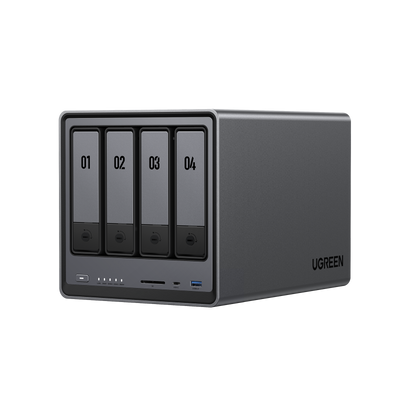
We’ve got good news for you: a NAS does not need an internet connection for its most important features. Systems such as the UGREEN NASync Series, including NASync DXP4800 Plus, are designed to work inside your home network even when the internet is unavailable. Your NAS is a local device and most of its functions depend on only your local network.

In this guide, we will explain the differences between your local (LAN) network and the internet, tell you which functions still work when you are not connected with the internet and which functions do not.
Key Takeaways:
- NAS Operates Offline: A NAS (Network Attached Storage) works without an internet connection for most key functions, such as local file storage, media streaming, and backups within your home network (LAN).
- LAN vs WAN: The NAS uses your local network (LAN) for tasks like file sharing, backups, and media streaming, while the internet (WAN) is only needed for remote access, cloud syncing, and updates.
- Offline Features: Without internet, your NAS can continue to provide file storage, media streaming, local backups, virtual machines, and multi-user access, offering reliable offline functionality.
- What Stops Working Offline: Remote access, cloud syncing, software updates, and app installations require internet access and will not function without it.
LAN vs WAN explained
There are two important terms when it comes to networks: LAN and WAN.
What is LAN: Local Area Network?
Your LAN is the private network within your home. Think of your router, laptops, phones, tablets, printers, smart TVs, your NAS and anything else connected through Wi-Fi or Ethernet. As long as your router is powered on, this internal network remains active, even if your internet provider is down.
A NAS is a LAN device. This means, without an internet connection, it can:
- Provide file storage
- Stream media to TVs and computers
- Host photo and video libraries
- Allow multiple users to access shared folders
- Handle local backups
- Run apps and services that do not need external access
What is WAN: Wide Area Network?
Then there is the WAN. This is the connection between your home network and the internet. This is your broadband connection, whether that is full-fibre, FTTC, cable, or 4G and 5G home broadband. If the WAN connection fails, anything that requires communication outside your home will stop working.
For many NAS devices, internet access enables features such as:
- Remote access from outside your home
- Cloud synchronisation
- Automatic software updates
- Downloads from app centre
- Certain mobile app features
Even if the WAN is offline, a NAS still operates normally inside your LAN
What can a NAS do offline?
An offline NAS can do a lot! Here are a few features that continue working within your local network.
Local file sharing
Look at your NAS (Network Attached Storage) as your own (offline) cloud. So even without an internet connection, you can still browse folders, move files, edit documents, watch videos, or load photos. This is perfect UK for households, for example:
- Families storing schoolwork, documents, and media libraries
- Home offices that need quick access to project files
- Households that want a private alternative to online storage
Computers with Windows or macOS can still see and open shared folders on your NAS over your home Wi-Fi or network cable, even if the internet is down.
Media streaming
A NAS can be used as a local media server without internet access. This includes:
- DLNA streaming to smart TVs
- Local Plex streaming (server and client must be on LAN)
Streaming locally is often faster and more reliable than cloud streaming, especially in homes where several people share the broadband connection.
Local backups
One of the most important uses of a NAS is to store backups. These processes do not require internet access:
- Back up computer/mobile devices locally
- Back up the NAS itself locally
- Back up another rsync server locally
- Internal backup between storage pools
Local virtual machines and containers
On models like the UGREEN NASync series, virtual machines and Docker containers continue to operate as normal offline. This is ideal for users running development tools, home automation systems, or internal web services.
What stops working without internet
Although a NAS can do most things offline, there are specific features that will pause until the broadband connection returns, which we explain below.
Remote access
When you are away from home, you cannot reach your NAS. For this, your NAS needs to be connected to the internet.
Cloud sync
Cloud services also need active WAN access. This includes well-known cloud facilities like:
- Google Drive
- OneDrive
Local tasks continue working, but cloud syncing will queue until your connection returns.
Software updates and app installations
Firmware updates and new apps usually need to be downloaded from online repositories. Without WAN access, update checks and installs will fail.
Real-life examples where offline NAS come in handy
Many UK homes benefit from the fact that a NAS can operate offline, like in these situations:

Image from unsplash
Rural homes with inconsistent broadband
In rural parts of Scotland, Wales, Northern Ireland and parts of Devon and Cornwall, outages can be common. With offline NAS home storage, you can still stream your favourite show.
Home offices with sensitive data
Many small business owners who work in photography, design, architecture, or legal services often prefer storing data locally on a NAS rather than relying solely on cloud services.
Large media libraries
A NAS media server can deliver films, TV series, home videos, and music instantly within the LAN. It’s perfect if you’ve got an extensive media library.

How to use a NAS offline on a local network
Setting up a NAS to work offline is easy and you won’t need internet access to complete the process.
Step 1: Connect the NAS to your router
Use an Ethernet cable. Even if your router is not connected to the internet, it will still manage your local network.
Step 2: Power on the NAS
The NAS will boot and appear on your network automatically.
Step 3: Access the dashboard from a device on the same network
Use the NAS IP address or NAS finder. Most devices offer a local discovery tool if needed.
Step 4: Create your shared folders
Decide how you want to organise your storage. Typical folders include media, documents, backups.
Step 5: Enable the correct sharing protocols
Turn on SMB, NFS, or any other protocol required by your devices.
Step 6: Map the NAS to your computers
On Windows or macOS, map shared folders so they appear like regular drives. This makes them easy to access even without the internet.
Step 7: Ignore or disable WAN-dependent applications
Cloud sync apps or external access tools will simply remain idle until broadband returns.
Once complete, your NAS will run entirely on your LAN.
How UGREEN NASync and the DXP4800 Plus work offline
The UGREEN NASync series, including the DXP4800 Plus, is designed to provide full functionality inside your LAN even when your internet is unavailable.

These functions work offline:
- Local file sharing
- High speed transfers within the LAN
- Media streaming
- Multi-user access
- RAID rebuilding and management
- Local backups and scheduled jobs
- Docker and virtual machine workloads
In other words: everything most people use a NAS for continues to work perfectly.
These functions need internet:
- Remote access through the UGREEN cloud
- Cloud synchronisation services
- Online firmware updates
- Online documentation and help pages
- Downloading apps from online repositories
Even without these, the system remains very capable for home and home office use.
Your own NAS home storage without internet
So, does a NAS work without the internet? Yes, it does. A NAS works perfectly well without internet and will continue to deliver most of the features that make it valuable in a modern UK home. Local file access, media streaming, backups and multi user sharing all operate smoothly in a LAN only setup.
Internet access mainly provides additional convenience through remote access, cloud syncing, and update downloads. These are helpful but not essential for everyday use.
For households looking for reliable offline storage, or for home offices that need dependable access to important files regardless of broadband issues, check out our NAS storage for home.
Quick Navigation
Related Reads

Can I Use a NAS Drive as a Regular Hard Drive?
26/11/2025

NAS vs. Cloud vs. External Drives: What’s the Best Storage for You?
07/11/2025

What Is 2FA and Why You Should Set It Up for Your Home NAS
11/11/2025

How to Set Up NAS for Beginners: Easy Storage Guide 2025
04/06/2025

2025 RAID Configuration Guide
09/07/2025